Cline Configuration
Pay-as-you-go MiMo API and Token Plan both support Cline. Refer to this guide for configuration and usage.
Prerequisites
Obtain Credentials
Supports two usage methods, but the corresponding credential acquisition methods are different:
| Usage Method | Description | Acquisition Method (BASE_URL and API Key below are examples) |
|---|---|---|
| Pay-as-you-go MiMo API | Charged based on actual usage, suitable for light use |
Go to API Keys to create an API Key |
| Token Plan | Fixed subscription fee, with limited calls based on the package |
After successful subscription, go to Subscription to obtain the exclusive Base URL and API Key |
Use Cline CLI
Install Cline CLI
Prerequisites: Node.js 20 or later is required (Node.js 22 recommended).
Installation command:
npm install -g cline
Verify installation (if a version number is displayed, the installation was successful):
cline --version
Configure Basic Settings
Cline CLI uses the cline auth command to configure API providers. Run the following command to configure MiMo model:
cline auth -p openai -k MIMO_API_KEY -b BASE_URL -m mimo-v2.5-pro
Parameter descriptions:
-
-p openai: Select OpenAI-compatible provider -
-k: Enter the API Key obtained from the corresponding usage method -
-b: Enter the BASE_URL obtained from the corresponding usage method -
-m: Enter the model ID, e.g.mimo-v2.5-pro
For more detailed configuration information, visit the Cline CLI Official Documentation.
You can also configure via the interactive wizard by running cline auth and following the prompts.
Use Cline CLI
After completing the configuration, open a new terminal and run the following command to start Cline CLI.
If you prefer the classic terminal interface, select
Exitand runcline --tuito return to the familiar command-line environment.
cline
After starting, you can use MiMo models in Cline CLI.
Use Cline IDE Plugin
Install Plugin
Search for and install the Cline plugin in the VS Code Extensions marketplace.

Configure Basic Settings
Open the Cline plugin in VS Code and fill in the following configuration:
-
Required settings:
-
API Provider: Select
OpenAI Compatible -
Base URL: Fill in the BASE_URL obtained through the corresponding usage method
-
API Key: API Key obtained from the corresponding usage method
-
Model ID: Enter the model name
mimo-v2.5-pro
-
-
Optional settings:
-
Uncheck Supports Images
-
Set Context Window Size to
1048576 -
Set Temperature to
1.0, adjustable based on task requirements
-
Other parameters not mentioned can be adjusted as needed.
Use Cline Plugin
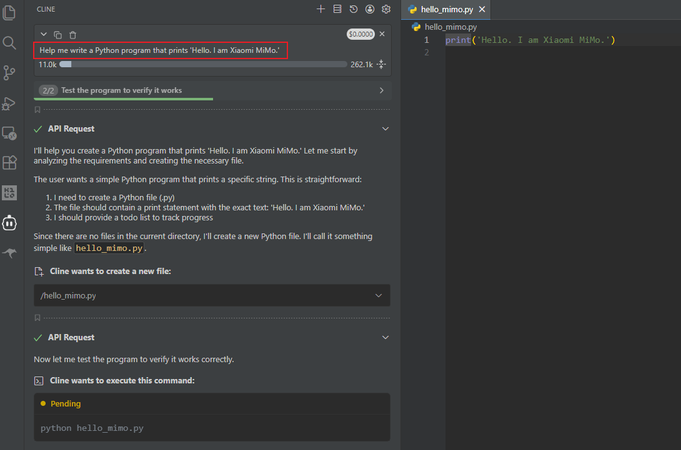
After successful configuration, enter your request in the input box, for example to generate code: